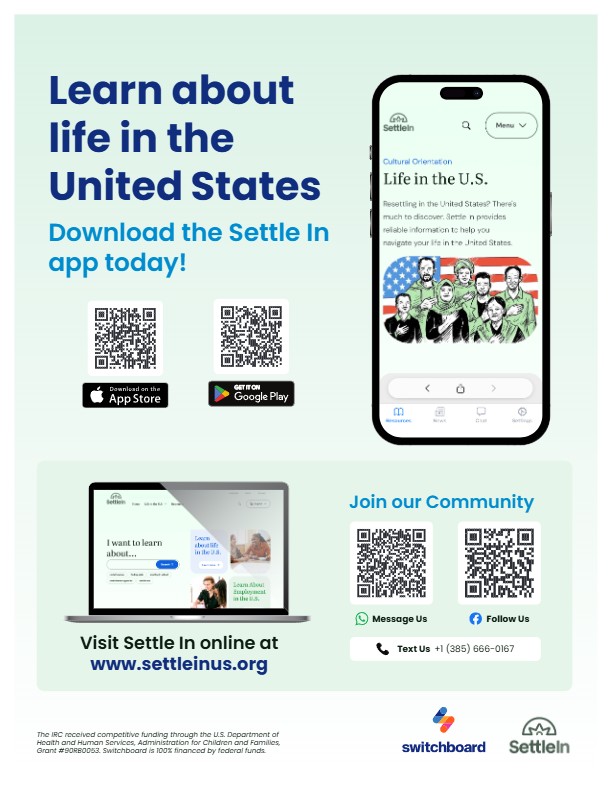

Newcomer clients need reliable information about life in the U.S. long after an appointment with their caseworker ends, and they need it in a language they understand. Settle In, Switchboard’s platform for newcomers, gives clients multilingual content they can use on their own. This blog post covers what Settle In offers, how to match clients to the right platform, and how to build it into your intake, case management, and group programming.
Settle In is a free multilingual and multiplatform digital resource that helps newly arrived refugees and immigrants learn about life in the United States in their own language, at their own pace. There is no sign-up, no account, and no cost. Topics include housing, employment, health, education, transportation, and cultural orientation. Check out this client-facing video for more about what Settle In offers.
Five Ways to Access Settle In
Settle In is available on five platforms. Choose which platform to recommend based on your client’s language (see the table below) and comfort with technology.
Settle In App (iOS and Google Play): The best single access point for clients with a smartphone. The app brings everything together and includes the full content library, two-way messaging, curated YouTube playlists, and a Facebook newsfeed, all in one download.
Facebook page: Useful for clients who already use Facebook. Includes live events, timely information and updates, and direct messaging with the Settle In digital community liaison team.
Website (settleinus.org): Articles, videos, and printable fact sheets in 11 languages, ready to share directly with newcomers. No login or personal information is required. A strong option for clients whose language isn’t available on Facebook.
YouTube (youtube.com/@SettleInUS): More than 600 multilingual videos and curated playlists, with new content added regularly. Settle In live events are available to replay the following day.
Two-way messaging: Clients can message the Settle In team through the app, Facebook Messenger, WhatsApp, Viber, or Telegram and receive a response from the digital community team in their language. Two-way messaging is currently available in English, Dari, Pashto, Russian, Spanish, Ukrainian, Haitian Creole, and French.
Privacy and Trust
Clients don’t need an account or personal information to access Settle In’s website and resources. Advise newcomers to avoid sharing sensitive details such as their full name, case number, or immigration status when contacting the Settle In team. Learn more in our privacy policy.
Languages and Communities Served
Language coverage varies by platform. Use the table below to match your client to the right Settle In access point.
| Language | App | Website | Two-Way Messaging | |
|---|---|---|---|---|
| Arabic | ✓ | ✓ | ||
| Burmese | ✓ | ✓ | ||
| Dari | ✓ | ✓ | ✓ | ✓ |
| English | ✓ | ✓ | ✓ | ✓ |
| French | ✓ | |||
| Haitian Creole | ✓ | ✓ | ✓ | ✓ |
| Kinyarwanda | ✓ | ✓ | ||
| Pashto | ✓ | ✓ | ✓ | |
| Russian | ✓ | ✓ | ✓ | |
| Spanish | ✓ | ✓ | ✓ | ✓ |
| Swahili | ✓ | ✓ | ||
| Ukrainian | ✓ | ✓ | ✓ | ✓ |
The YouTube channel covers all of these languages, plus a few others.
How to Integrate Settle In into Your Work
In the waiting room
Print Settle In flyers and post them where clients sit. The QR codes link directly to the App Store and Google Play, so clients can start exploring while they wait. If you have a TV in your waiting room, play a Settle In YouTube playlist.
At intake
Settle In fits naturally into the moment when you’re introducing a client to your organization’s resources. Here’s a simple script:
“We have a free app called Settle In with information about housing, jobs, schools, and everyday life in the U.S., all in your language. There’s no sign-up required. Here’s a QR code to download it.”
Place the Settle In flyer in the intake packet alongside your standard resource handouts.
During client meetings
When clients have specific questions, direct them to relevant Settle In resources. For example:
- Health care: Show families where to find information about health care in the U.S. in their language.
- Artificial intelligence (AI): Share this Understanding AI article and video about using AI tools safely.
- Car seat safety: Direct parents and caregivers to this Settle In video explaining U.S. car seat safety guidelines.
In group orientations and digital literacy classes
Use Settle In as practice content for important digital skills, like scanning a QR code, downloading an app, and navigating a menu. Clients will leave your session with a resource they’ll use again. In group orientations, a short walkthrough at the start gets everyone set up at once.
The IRC received competitive funding through the U.S. Department of Health and Human Services, Administration for Children and Families, Grant #90RB0053. The project is 100% financed by federal funds. The contents of this document are solely the responsibility of the authors and do not necessarily represent the official views of the U.S. Department of Health and Human Services, Administration for Children and Families.